图像 (Img)
图像控件是用于显示图像的基本控件,支持移动、缩放、旋转等功能。
用法
创建控件
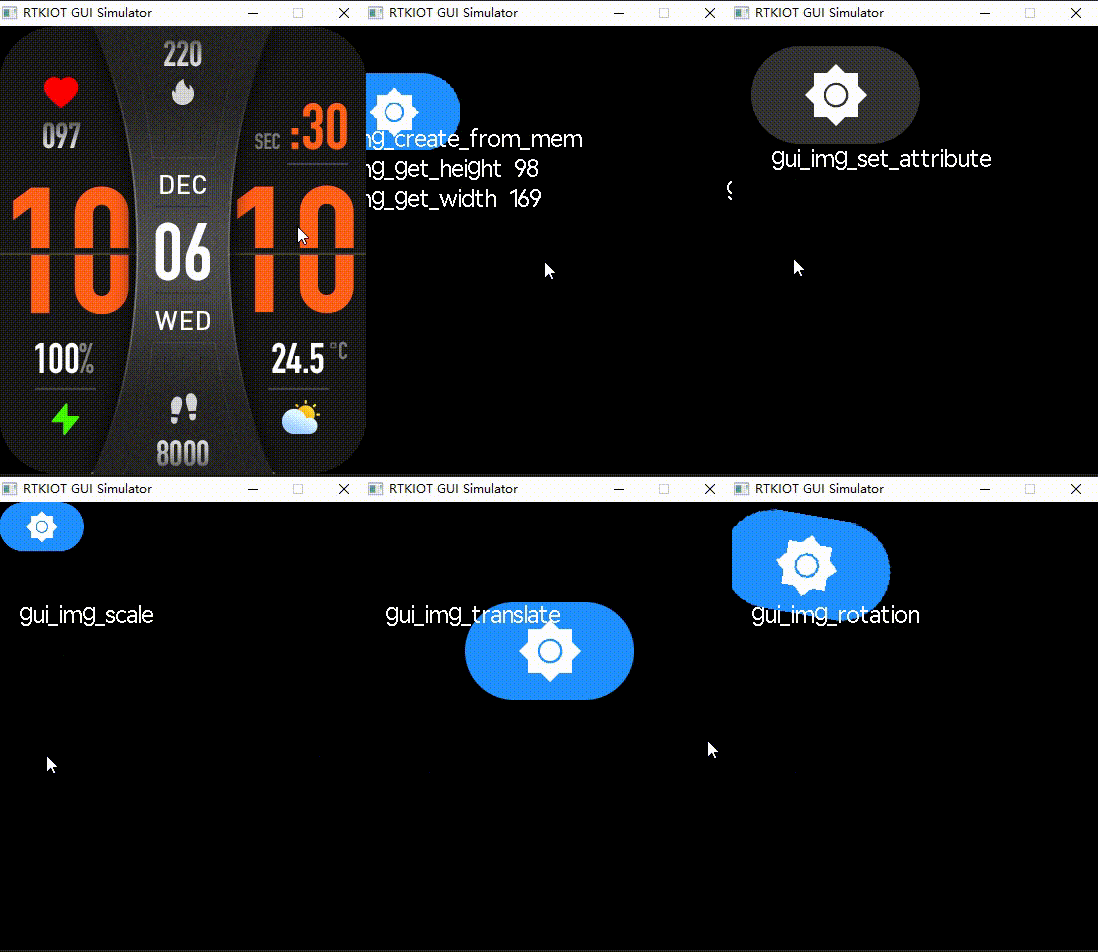
开发者可以使用 gui_img_create_from_mem() 从内存中创建一个图像控件,或者使用 gui_img_create_from_fs() 从文件系统中创建一个图像控件。同样,也可以使用 gui_img_create_from_ftl() 从闪存中创建一个图像控件。
如果图像控件的宽度或高度设置为 0,那么控件的大小将根据图像源的大小自动设置。
设置焦点
图片控件的默认焦点位置位于图片的左上角 (0, 0),开发者可以使用 gui_img_set_focus() 设置新的图片控件的焦点,设置完成之后,图片控件的变换、旋转、平移操作都会基于新的焦点进行。
设定属性
开发者可以通过 gui_img_set_attribute() 来设置图像控件的属性,替换为新图像并设置新坐标。
获取高度/宽度
如果想要获取图像控件的高度/宽度,开发者可以使用 gui_img_get_height() 或 gui_img_get_width()。
刷新大小
开发者可以调用 gui_img_refresh_size() 来刷新图像控件大小。
混合模式
开发者可以使用 gui_img_set_mode() 来设定图像控件的混合模式。
移动
通过 gui_img_translate() 来移动图像控件。
开发者可以将图像控件移动到新坐标,而不改变控件属性中的原始坐标。
旋转
开发者可以通过 gui_img_rotation() 来围绕圆心旋转图像控件。
缩放
开发者可以使用 gui_img_scale() 调整图像控件的大小以满足需求。
不透明度
图像控件的不透明度值是可调整的,开发者可以调用 gui_img_set_opacity() 来调整。
质量
开发者可以调用 gui_img_set_quality() 来设定图像控件的显示质量。
截屏
开发者可以使用 gui_img_tree_convert_to_img() 来保存全屏截图。保存的图像会是 RGB 格式。
示例
void test_event_cb(void *obj, gui_event_t e, void *param)
{
    GUI_UNUSED(e);
    GUI_UNUSED(param);
    gui_obj_t *this = (gui_obj_t *)obj;
    gui_log("Event test obj name = %s, e = 0x%x !\n", this->name, e);
}

void test_timer_cb(void *param)
{
    GUI_UNUSED(param);
    gui_log("timer cb test!\n");
}

#include "gifdec.h"
static int app_init(void)
{

    void *addr = (void *)_actiger_blue;
    // void *addr = (void *)_acgreen;
    // void *addr = (void *)_acgif_demo;

    // gui_img_create_from_mem(gui_obj_get_root(),  "img_1_test", _achour, 0, 0, 0, 0);
    gui_img_t *img = gui_img_create_from_mem(gui_obj_get_root(),  "img_1_test", addr, 0, 0, 0, 0);

    gui_img_a8_recolor(img, GUI_COLOR_ARGB8888(255, 0, 0, 0));

    gui_img_a8_fix_bg(img, GUI_COLOR_ARGB8888(255, 0xFF, 0x59, 0x01));

    gui_img_a8_mix_alpha(img, 128);

    gui_img_set_mode(img, IMG_2D_SW_FIX_A8_BGFG);

    // gui_img_set_focus(img, 50, 50);

    gui_img_rotation(img, 0.0f);
    // gui_img_scale(img, 0.5f, 0.5f);

    // gui_img_translate(img, 50, 50);

    // gui_obj_add_event_cb(img, (gui_event_cb_t)test_event_cb, GUI_EVENT_TOUCH_CLICKED, NULL);


    // gui_obj_create_timer(&(img->base), 1000, true, test_timer_cb);
    // gui_obj_start_timer(&(img->base));

    return 0;
}

GUI_INIT_APP_EXPORT(app_init);
API
Functions
-
uint16_t gui_img_get_width(gui_img_t *_this)
Load the image to read its width.
- Parameters
_this -- Image widget pointer.
- Returns
Image's width.
-
uint16_t gui_img_get_height(gui_img_t *_this)
Load the image to read its height.
- Parameters
_this -- Image widget pointer.
- Returns
Image's height.
-
void gui_img_refresh_size(gui_img_t *_this)
Refresh the image size from source.
- Parameters
_this -- Image widget pointer.
-
void gui_img_set_mode(gui_img_t *_this, BLEND_MODE_TYPE mode)
Set the image's blend mode.
- Parameters
_this -- Image widget pointer.
mode -- Enumeration value of the mode (BLEND_MODE_TYPE).
-
void gui_img_set_attribute(gui_img_t *_this, const char *name, void *addr, int16_t x, int16_t y)
Set image attributes (name, path, position).
- Parameters
this -- Image widget pointer.
name -- Widget name.
addr -- Image address/path.
x -- X-axis coordinate.
y -- Y-axis coordinate.
-
void gui_img_rotation(gui_img_t *_this, float degrees)
Rotate the image around its center.
- Parameters
_this -- Image widget pointer.
degrees -- Clockwise rotation absolute angle.
-
void gui_img_scale(gui_img_t *_this, float scale_x, float scale_y)
Scale the image, taking (0,0) as the zoom center.
- Parameters
_this -- Image widget pointer.
scale_x -- Scale factor in X direction.
scale_y -- Scale factor in Y direction.
-
void gui_img_translate(gui_img_t *_this, float t_x, float t_y)
Translate (move) the image.
- Parameters
_this -- Image widget pointer.
t_x -- New X-axis coordinate.
t_y -- New Y-axis coordinate.
-
void gui_img_skew_x(gui_img_t *_this, float degrees)
Skew the image on X-axis.
- Parameters
_this -- Image widget pointer.
degrees -- Skew angle.
-
void gui_img_skew_y(gui_img_t *_this, float degrees)
Skew the image on Y-axis.
- Parameters
_this -- Image widget pointer.
degrees -- Skew angle.
-
void gui_img_set_opacity(gui_img_t *_this, unsigned char opacity_value)
Set the opacity of the image.
- Parameters
_this -- Image widget pointer.
opacity_value -- Opacity value (0-255, default 255).
-
void gui_img_set_focus(gui_img_t *_this, float c_x, float c_y)
Set the focus point for image transformations.
- Parameters
_this -- Image widget pointer.
c_x -- Center X coordinate.
c_y -- Center Y coordinate.
-
gui_img_t *gui_img_create_from_mem(void *parent, const char *name, void *addr, int16_t x, int16_t y, int16_t w, int16_t h)
Create an image widget from memory address.
Note
Create an image widget and set attribute.
- Parameters
parent -- Father widget it nested in.
name -- Widget name.
addr -- Bin file address.
x -- X-axis coordinate of the widget.
y -- Y-axis coordinate of the widget.
w -- Width of the widget.
h -- Height of the widget.
- Returns
Widget object pointer.
-
gui_img_t *gui_img_create_from_ftl(void *parent, const char *name, void *ftl, int16_t x, int16_t y, int16_t w, int16_t h)
Create an image widget from memory address.
Note
Create an image widget and set attribute.
- Parameters
parent -- Father widget it nested in.
name -- Widget name.
ftl -- Not xip address, use ftl address.
x -- X-axis coordinate of the widget.
y -- Y-axis coordinate of the widget.
w -- Width of the widget.
h -- Height of the widget.
- Returns
Widget object pointer.
-
gui_img_t *gui_img_create_from_fs(void *parent, const char *name, void *file, int16_t x, int16_t y, int16_t w, int16_t h)
Create an image widget from filesystem.
- Parameters
parent -- Father widget it nested in.
name -- Image widget name.
file -- Image file path.
x -- X-axis coordinate of the widget.
y -- Y-axis coordinate of the widget.
w -- Width of the widget.
h -- Height of the widget.
- Returns
Pointer to the created image widget.
-
void gui_img_set_quality(gui_img_t *_this, bool high_quality)
Set the image's quality.
- Parameters
_this -- Image widget pointer.
high_quality -- True for high quality rendering, false otherwise.
-
void gui_img_tree_convert_to_img(gui_obj_t *obj, gui_matrix_t *matrix, uint8_t *shot_buf)
Convert a tree to an image data.
- Parameters
obj -- Tree root.
matrix -- Null if no need to transform.
shot_buf -- Buffer for the screenshot.
-
float gui_img_get_scale_x(gui_img_t *_this)
Get the scale factor in X direction.
- Parameters
_this -- Image widget pointer.
- Returns
Scale factor in X direction.
-
float gui_img_get_scale_y(gui_img_t *_this)
Get the scale factor in Y direction.
- Parameters
_this -- Image widget pointer.
- Returns
Scale factor in Y direction.
-
float gui_img_get_degrees(gui_img_t *_this)
Get the rotation angle in degrees.
- Parameters
_this -- Image widget pointer.
- Returns
Rotation angle in degrees.
-
float gui_img_get_c_x(gui_img_t *_this)
Get the center X coordinate for transformations.
- Parameters
_this -- Image widget pointer.
- Returns
Center X coordinate.
-
float gui_img_get_c_y(gui_img_t *_this)
Get the center Y coordinate for transformations.
- Parameters
_this -- Image widget pointer.
- Returns
Center Y coordinate.
-
float gui_img_get_t_x(gui_img_t *_this)
Get the translation in X direction.
- Parameters
_this -- Image widget pointer.
- Returns
Translation in X direction.
-
float gui_img_get_t_y(gui_img_t *_this)
Get the translation in Y direction.
- Parameters
_this -- Image widget pointer.
- Returns
Translation in Y direction.
-
void gui_img_set_image_data(gui_img_t *_this, const uint8_t *image_data_pointer)
Sets the image data for a specified image widget.
This function assigns the given image data to the specified image widget. The image data might correspond to various formats, and the format should be compatible with the handling of
gui_img_t.- Parameters
_this -- Pointer to the image widget (
gui_img_t) for which the image data is to be set.image_data_pointer -- Pointer to the image data to be set to the widget. The data should persist as long as the widget needs it or until it is explicitly updated.
-
const uint8_t *gui_img_get_image_data(gui_img_t *_this)
Gets the image data from a specified image widget.
This function returns the current image data that is set in the specified image widget.
- Parameters
_this -- Pointer to the image widget (
gui_img_t) from which the image data should be retrieved.- Returns
Pointer to the image data currently set in the widget. If no image data is set, the result may be
NULL.
-
void gui_img_a8_recolor(gui_img_t *_this, uint32_t fg_color_mix)
Sets the foreground color mixing value for the image widget.
-
struct gui_img_t
Image widget structure.
Public Members
-
gui_obj_t base
-
draw_img_t *draw_img
-
float degrees
-
float scale_x
-
float scale_y
-
float f_x
-
float f_y
-
float t_x
-
float t_y
-
void *data
-
void *filename
-
void *ftl
-
gd_GIF *gif
-
uint32_t fg_color_set
-
uint32_t bg_color_fix
-
uint32_t opacity_value
-
uint32_t blend_mode
-
uint32_t storage_type
-
uint32_t high_quality
-
uint32_t need_clip
-
uint32_t gif_flag
-
uint8_t checksum
-
uint8_t animate_array_length
-
gui_obj_t base