Software Accelerate
Overall Flow Chart
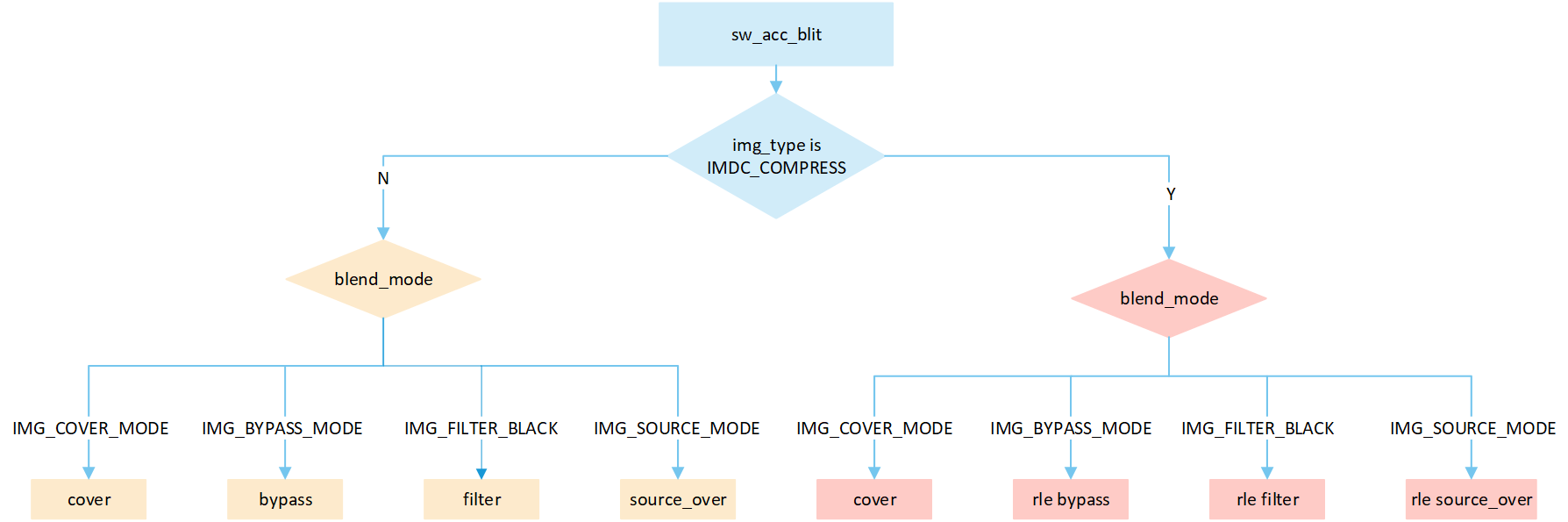
The flowchart depicts the image resource processing flow accelerated by software. When processing images, different processing methods are selected based on the compression status and type of image:
Cover: Write the source image data directly to the corresponding position in the frame buffer. Do not perform any processing, just overwrite it.
Bypass: Write the source image data directly to the corresponding position in the frame buffer. Bypass mode is incapable of handling the transparency of images. It applies a global opacity value to the entire image, thereby affecting the overall transparency. When it comes to creating transparency effects, bypass mode is more space-efficient compared to source_over mode.
Filter black: The filtering technique effectively sifts out pixel data with a value of zero from the originating image data, which essentially means that black pixels are precluded from being inscribed into the frame buffer. This mechanism induces much swifter refresh dynamics. Pixels of any color other than black undergo the standard processing method and are duly recorded into the frame buffer.
Source_over: A blending method that combines image color data and frame buffer pixel color data to calculate the final color based on the
opacity_valuevalue Sa, and writes it to the corresponding location in the frame buffer. The formula is ((255 - Sa) * D + Sa * S) / 255), whereSais theopacity_valueof the original image,Dis the frame buffer pixel data, andSis the source image pixel data.
Software Acceleration
The
img_typecan be obtained from theheadof the image, where the structure of the image head is as follows.
typedef struct gui_rgb_data_head
{
    unsigned char scan : 1;
    unsigned char align : 1;
    unsigned char resize: 2; //0-no resize;1-50%(x&y);2-70%;3-80%
    unsigned char compress: 1;
    unsigned char jpeg: 1;
    unsigned char idu: 1;
    unsigned char rsvd : 1;
    char type;
    short w;
    short h;
    char version;
    char rsvd2;
} gui_rgb_data_head_t;
The value of
img_typeis depicted in the enum below. If the value isIMDC_COMPRESS, it indicates that the image is compressed and enters the RLE processing flow; otherwise, it enters the no RLE processing flow.
/**
 * GUI_FormatType
 * Pixel and image format identifiers.
 * Note: Bit indices refer to positions within the pixel word where bit0 is LSB.
 */
typedef enum
{
    /* Packed RGB formats, pls refs def_color.h */
    RGB565       = 0,  /* 16-bit: bit[4:0] for Blue, bit[10:5] for Green, bit[15:11] for Red */
    ARGB8565     = 1,  /* 24-bit: bit[4:0] for Blue, bit[10:5] for Green, bit[15:11] for Red, bit[23:16] for Alpha, packed*/
    RGB888       = 3,  /* 24-bit: bit[7:0] for Blue, bit[15:8] for Green, bit[23:16] for Red */
    ARGB8888     = 4,  /* 32-bit: bit[7:0] for Blue, bit[15:8] for Green, bit[23:16] for Red, bit[31:24] for Alpha */
    XRGB8888     = 5,  /* 32-bit: bit[7:0] for Blue, bit[15:8] for Green, bit[23:16] for Red, bit[31:24] for X (unused or fixed 0xFF) */

    /* Luma / mask / indexed formats */
    BINARY       = 6,  /* 1-bit monochrome (black/white) */
    GRAY         = 7,  /* Grayscale, 8 bits per pixel */
    ALPHAMASK    = 9,  /* Alpha-only mask (default 8 bits) */
    PALETTE      = 10, /* Indexed color using a palette (CLUT) */

    /* Encoded image container formats */
    BMP          = 11, /* BMP image file format */
    JPEG         = 12, /* JPEG image file format */
    PNG          = 13, /* PNG image file format */
    GIF          = 14, /* GIF image file format */

    RTKARGB8565  = 15, /* Planar: [A 8bpp plane][RGB565 plane], not interleaved */

    /* Grayscale subtypes (luminance only) */
    GRAY1        = BINARY, /* 1 bpp grayscale (2 levels) */
    GRAY2        = 0x21,   /* 2 bpp grayscale (4 levels) */
    GRAY4        = 0x22,   /* 4 bpp grayscale (16 levels) */
    GRAY8        = GRAY,   /* 8 bpp grayscale (256 levels) */
    A8           = 0x30,   /* 8 bpp alpha (256 levels) */
    A4           = 0x31,   /* 4 bpp alpha (16 levels) */
    A2           = 0x32,   /* 2 bpp alpha (4 levels) */
    A1           = 0x33,   /* 1 bpp alpha (2 levels) */
    X8           = 0x34,   /* 8 bpp X (256 levels) */
    X4           = 0x35,   /* 4 bpp X (16 levels) */
    X2           = 0x36,   /* 2 bpp X (4 levels) */
    X1           = 0x37,   /* 1 bpp X (2 levels) */
    I8           = 0x38,   /* 8 bpp indexed (256 levels) */
    I4           = 0x39,   /* 4 bpp indexed (16 levels) */
    I2           = 0x3a,   /* 2 bpp indexed (4 levels) */
    I1           = 0x3b,   /* 1 bpp indexed (2 levels) */
} GUI_FormatType;
Execute the corresponding blit process based on different
blend_mode.
typedef enum
{
    IMG_BYPASS_MODE = 0,
    IMG_FILTER_BLACK,
    IMG_SRC_OVER_MODE, //S * Sa + (1 - Sa) * D
    IMG_COVER_MODE,
    IMG_RECT,
    IMG_2D_SW_RGB565_ONLY,
    IMG_2D_SW_SRC_OVER_MODE, //S * Sa + (1 - Sa) * D
    IMG_2D_SW_FIX_A8_FG, //fixed fg
    IMG_2D_SW_FIX_A8_BGFG, //fixed fg and bg
    IMG_PLUS_DARKER, //darken blend: min(blended, background)
    IMG_A8_BLUR, //A8-shaped blur: blur the framebuffer under the image, masked by the A8 alpha
} BLEND_MODE_TYPE;
When the image is compressed, it is necessary to obtain the compression header from the address of the compressed data. The
algorithm_typeparameter of this header contains the actual image type. The types of compressed images are described in theimdc_src_typestruct.
typedef struct imdc_file_header
{
    struct
    {
        uint8_t algorithm: 2;
        uint8_t feature_1: 2;
        uint8_t feature_2: 2;
        uint8_t pixel_bytes: 2;
    } algorithm_type;
    uint8_t reserved[3];
    uint32_t raw_pic_width;
    uint32_t raw_pic_height;
} imdc_file_header_t;
typedef enum
{
    IMDC_SRC_1BIT = 0x00,
    IMDC_SRC_2BIT = 0x01,
    IMDC_SRC_4BIT = 0x02,
    IMDC_SRC_8BIT = 0x03,
    IMDC_SRC_16BIT = 0x04,
    IMDC_SRC_24BIT = 0x05,
    IMDC_SRC_32BIT = 0x06,
} imdc_src_type;
Overview No RLE Cover Mode
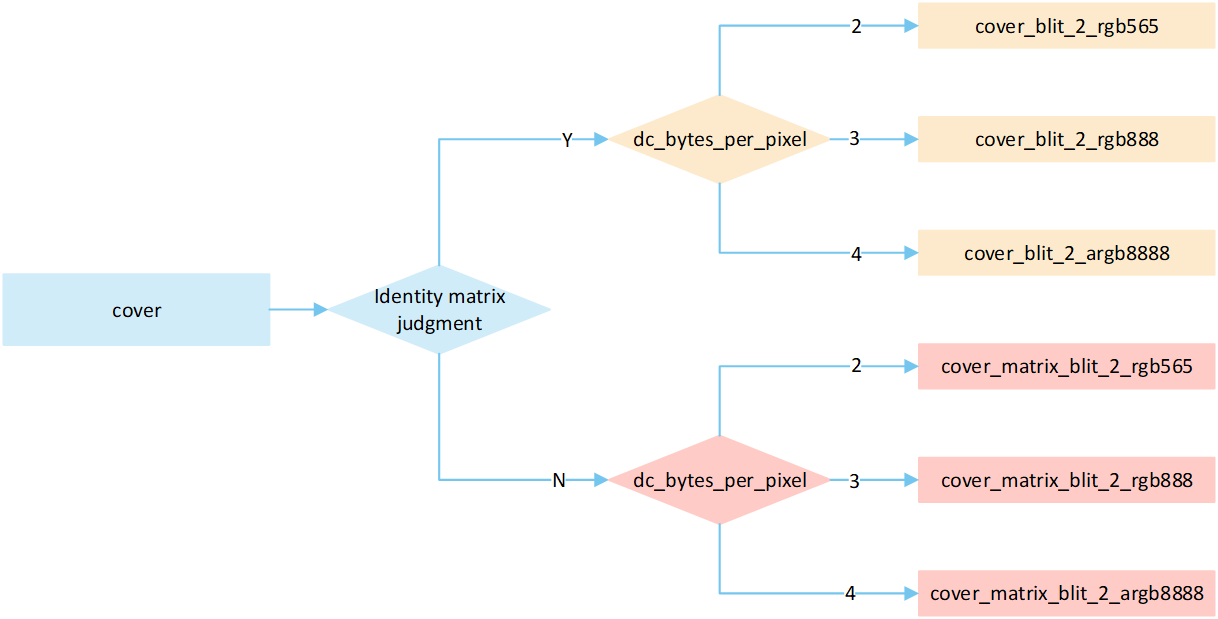
The following flow describes the cover mode process for No RLE compressed image. Select a processing method based on the image matrix and the pixel byte of the display device, and write it to the frame buffer.
Cover Mode Path
If the matrix is an identity matrix, a blit process without matrix operations is performed; otherwise, a blit process with matrix operations is carried out.
The
dc_bytes_per_pixelis pixel bytes of display device, calculated asdc->bit_depth >> 3, wherebit_depthis the bit depth of the display device. Taking a display device with a bit depth of 24 as an example, its pixel bytes are 3.
No RLE Cover
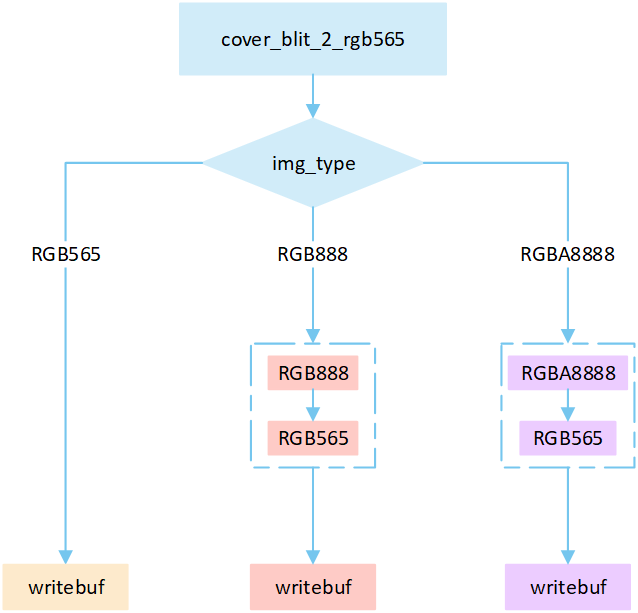
The following flowchart describes the process of writing uncompressed images to a frame buffer in cover mode. Taking the target device image type as RGB565 as an example.
Cover_blit_2_rgb565
No RLE Cover Matrix
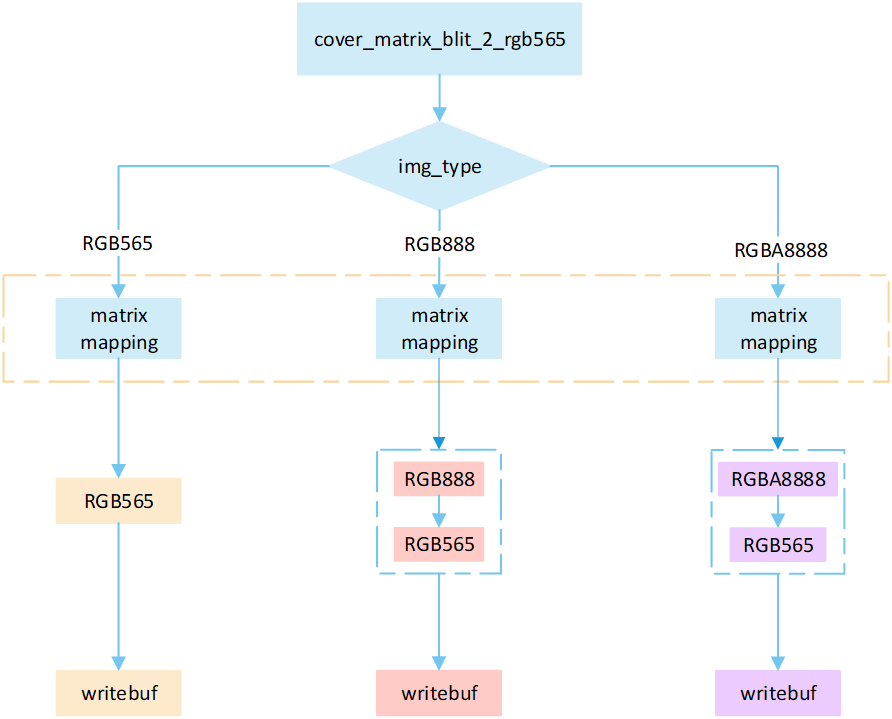
The following flowchart describes the process of writing uncompressed images to a frame buffer using cover mode with matrix operations. Taking the target device image type as RGB565 as an example.
Cover_matrix_blit_2_rgb565
Overview No RLE Bypass Mode
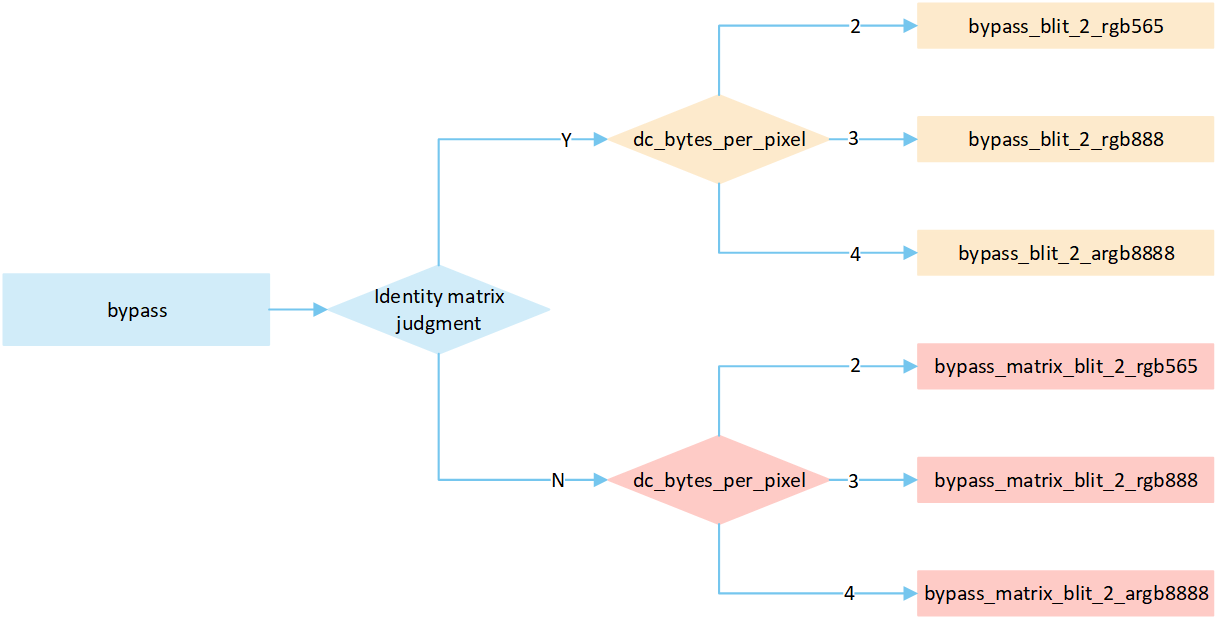
The following flow describes the bypass mode process for No RLE compressed image. Select a processing method based on the image matrix and the pixel byte of the display device, and write it to the frame buffer.
Bypass_mode_path
If the matrix is an identity matrix, a blit process without matrix operations is performed; otherwise, a blit process with matrix operations is carried out.
The
dc_bytes_per_pixelis pixel bytes of display device, calculated asdc->bit_depth >> 3, wherebit_depthis the bit depth of the display device. Taking a display device with a bit depth of 24 as an example, its pixel bytes are 3.
No RLE Bypass Mode
The following flowchart describes the process of writing uncompressed images to a frame buffer in bypass mode . Taking the target device image type as RGB565 as an example.
Bypass_blit_2_rgb565
Perform different processing steps based on the
img_type.Based on the
opacity_value, execute the corresponding operation to write image pixels into the framebuffer.
If the
opacity_valueis 0 , the image is not displayed and the process is break.If the
opacity_valueis 255 , convert the source image pixels to RGB565 format and write them to the frame buffer.If the
opacity_valueis between 0 and 255 , perform an alpha blending operation to blend the source image pixels with the corresponding frame buffer pixels. The blending formula is ((255 - Sa) * D + Sa * S) / 255) . Write the blended result to the frame buffer.
No RLE Bypass Matrix
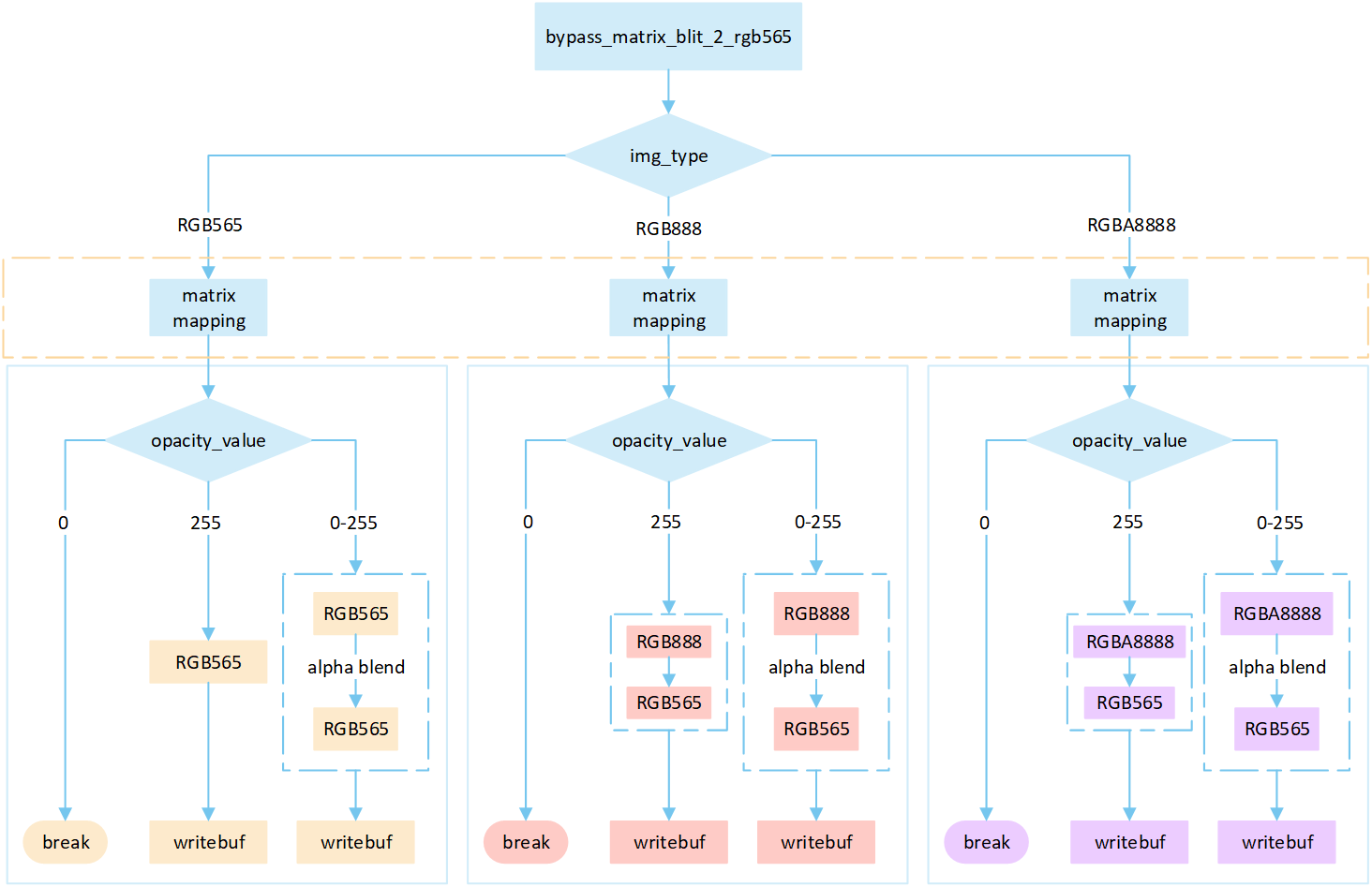
The following flowchart describes the process of writing uncompressed images to a frame buffer using blend mode with matrix operations. Taking the target device image type as RGB565 as an example.
Bypass_matrix_blit_2_rgb565
Perform different processing steps based on the
img_type.Perform matrix calculation to map the target area write-in points to image pixels, and obtain the pixel value of the image pixels.
Based on the
opacity_value, execute the corresponding operation to write image pixels into the framebuffer.
If the
opacity_valueis 0, the image is not displayed and the process is break.If the
opacity_valueis 255, convert the source image pixels to RGB565 format and write them to the frame buffer.If the
opacity_valueis between 0 and 255, perform an alpha blending operation to blend the source image pixels with the corresponding frame buffer pixels. The blending formula is ((255 - Sa) * D + Sa * S) / 255). Write the blended result to the frame buffer.
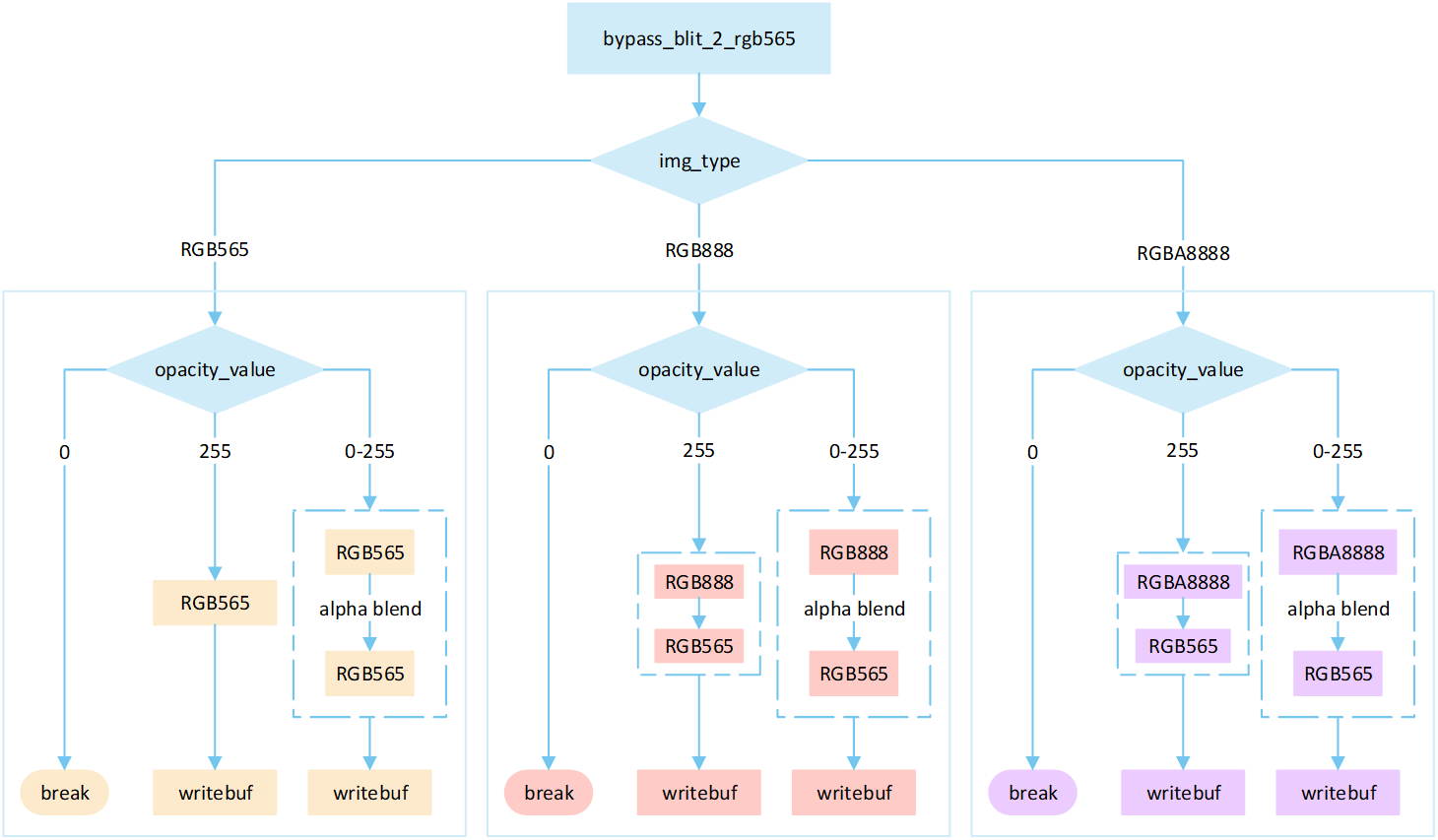
Overview No RLE Filter
The following flow describes the filter mode process for No RLE compressed image. Select a processing method based on the image matrix and the pixel byte of the display device, and write it to the frame buffer.
Filter_mode_path
No RLE Filter
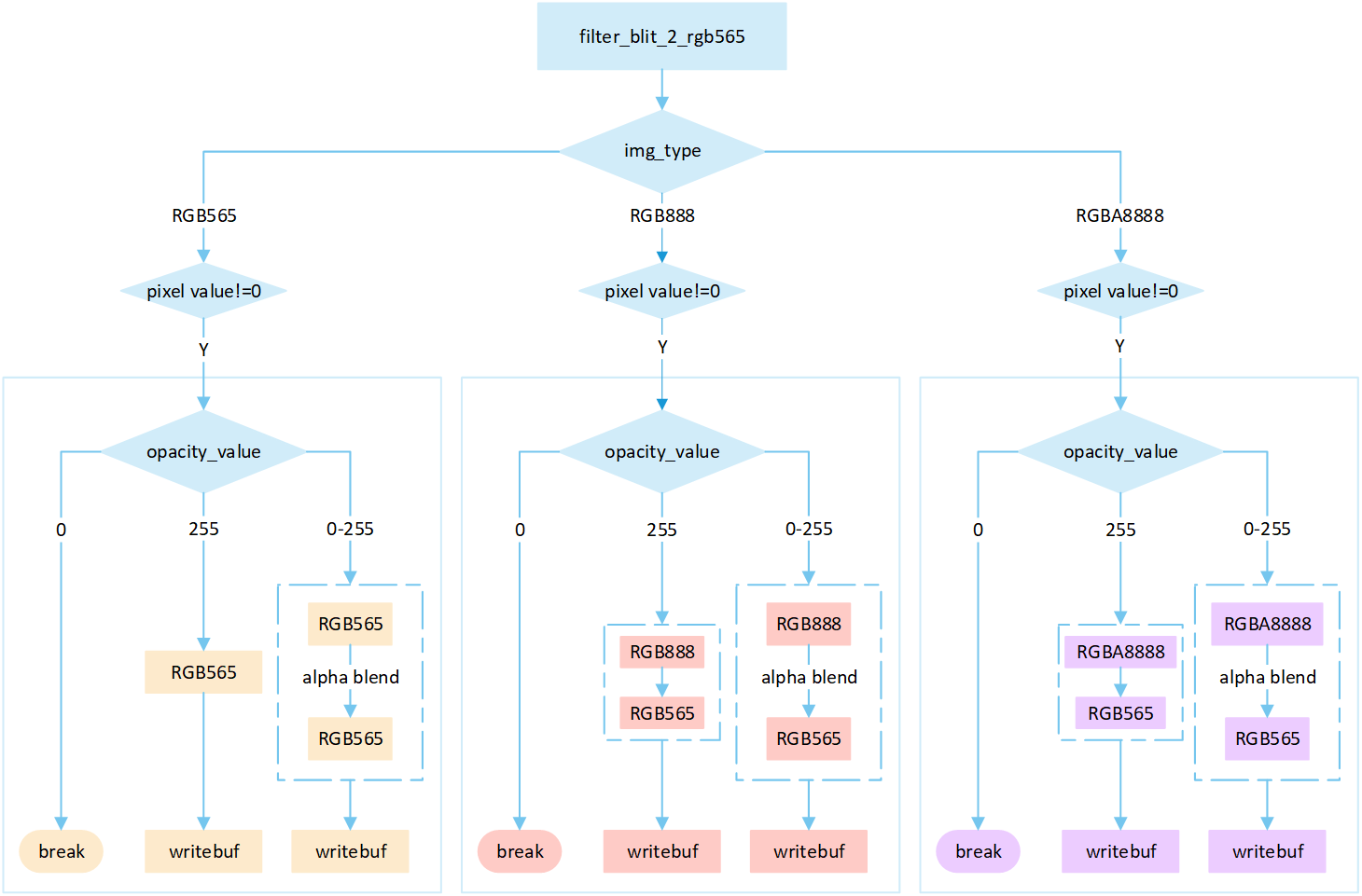
The following flowchart describes the process of writing uncompressed images to a frame buffer using filter mode. Taking the target device image type as RGB565 as an example.
Filter_blit_2_rgb565
Perform different processing steps based on the
img_type.If the pixel value is 0, skip the processing; otherwise, perform the subsequent writing operation.
Based on the
opacity_value, execute the corresponding operation to write image pixels into the framebuffer.
If the
opacity_valueis 0, the image is not displayed and the process is break.If the
opacity_valueis 255, convert the source image pixels to RGB565 format and write them to the frame buffer.If the
opacity_valueis between 0 and 255, perform an alpha blending operation to blend the source image pixels with the corresponding frame buffer pixels. The blending formula is ((255 - Sa) * D + Sa * S) / 255). Write the blended result to the frame buffer.
No RLE Filter Matrix
The following flowchart describes the process of writing uncompressed images to a frame buffer using filter mode with matrix operations . Taking the target device image type as RGB565 as an example.
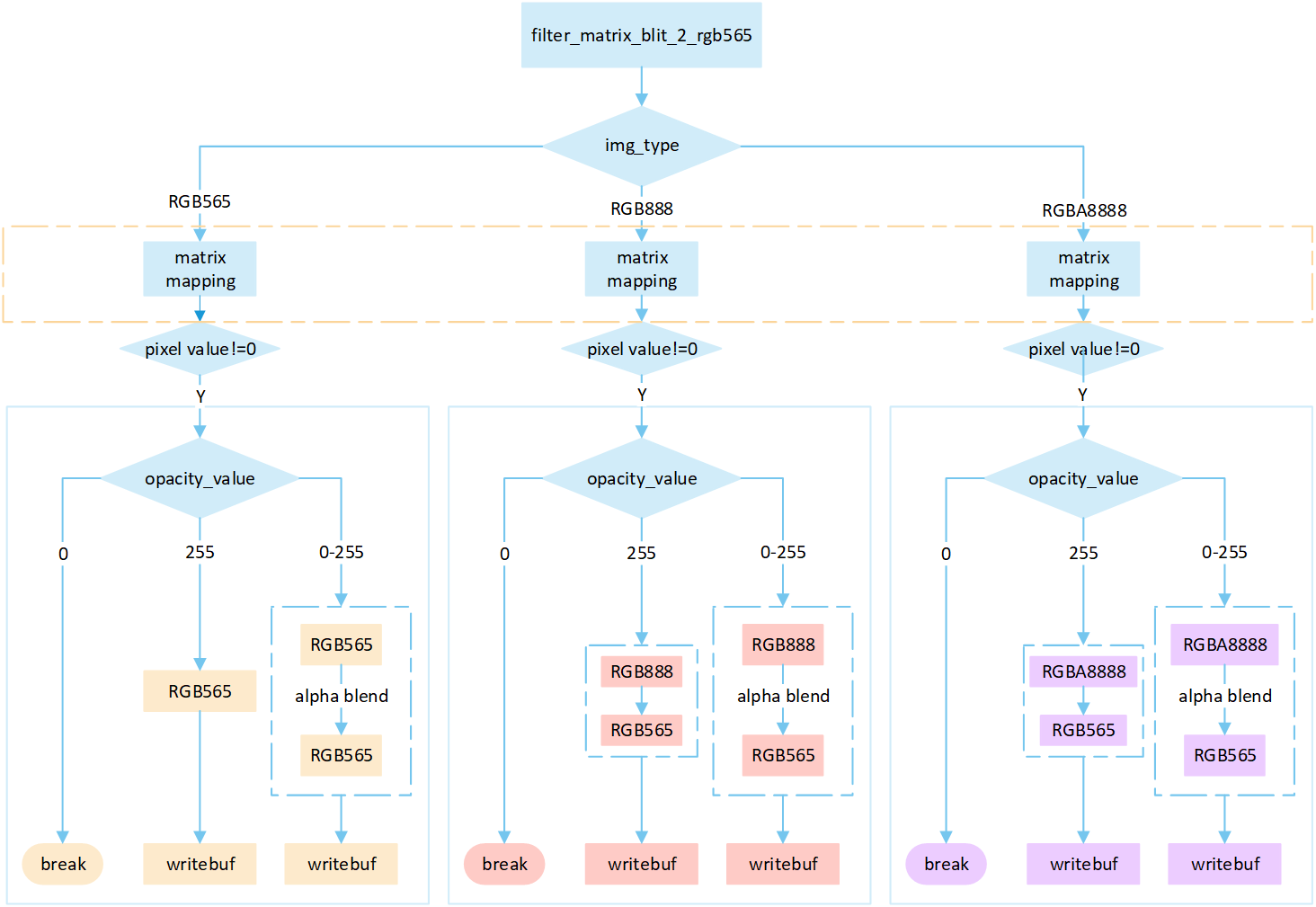
Filter_matrix_blit_2_rgb565
Perform different processing steps based on the
img_type.Perform matrix calculation to map the target area write-in points to image pixels, and obtain the pixel value of the image pixels.
If the pixel value is 0, skip the processing; otherwise, perform the subsequent writing operation.
Based on the
opacity_value, execute the corresponding operation to write image pixels into the framebuffer.
If the
opacity_valueis 0, the image is not displayed and the process is break.If the
opacity_valueis 255, convert the source image pixels to RGB565 format and write them to the frame buffer.If the
opacity_valueis between 0 and 255, perform an alpha blending operation to blend the source image pixels with the corresponding frame buffer pixels. The blending formula is ((255 - Sa) * D + Sa * S) / 255). Write the blended result to the frame buffer.
Overview No RLE Source_over
The following flow describes the source_over mode process for No RLE compressed image. Select a processing method based on the image matrix and the pixel byte of the display device, and write it to the frame buffer.
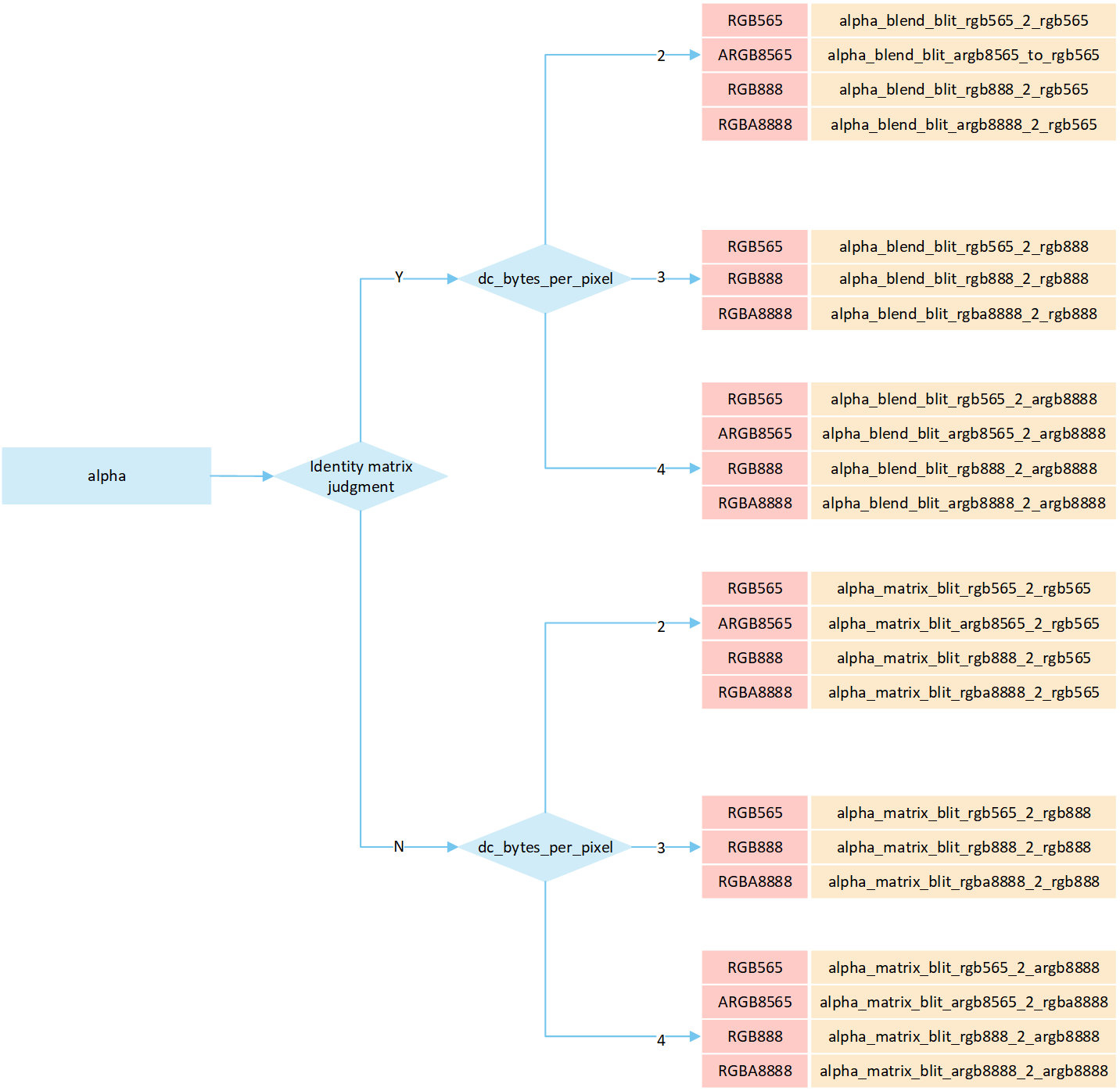
Alpha_mode_path
No RLE Alpha No Matrix
The following flowchart describes the process of writing uncompressed images to a frame buffer using source_over mode. Taking the target device image type as RGB565 and the source image type as RGB565 as an example.
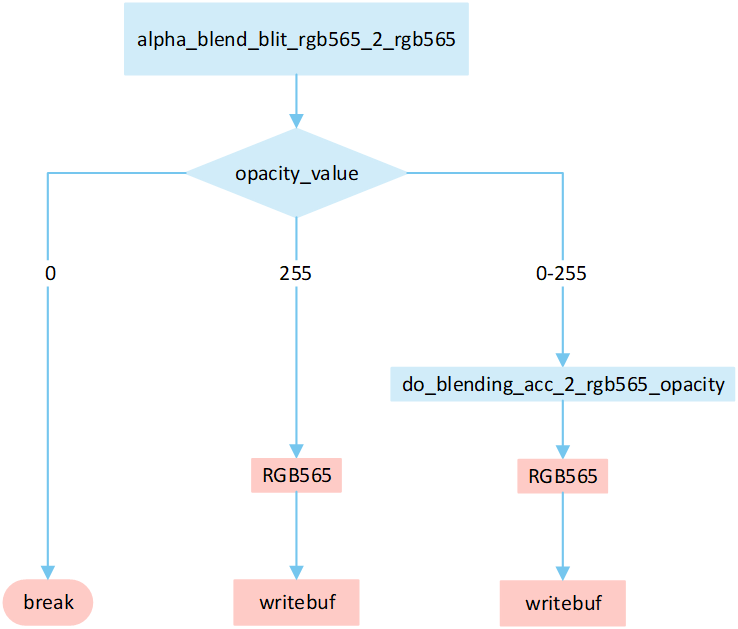
Alpha_blit_2_rgb565
Based on the opacity_value , execute the corresponding operation to write image pixels into the framebuffer.
If the
opacity_valueis 0, the image is not displayed and the process is break.If the
opacity_valueis 255, convert the source image pixels to RGB565 format and write them to the frame buffer.If the
opacity_valueis between 0 and 255, performrgb565_fast_blendingto blend the source image pixels with the corresponding frame buffer pixels. Write the blended result to the frame buffer.
No RLE Alpha Matrix
The following flowchart describes the process of writing uncompressed images to a frame buffer using source_over mode with matrix operations. Taking the target device image type as RGB565 and the source image type as RGB565 as an example.
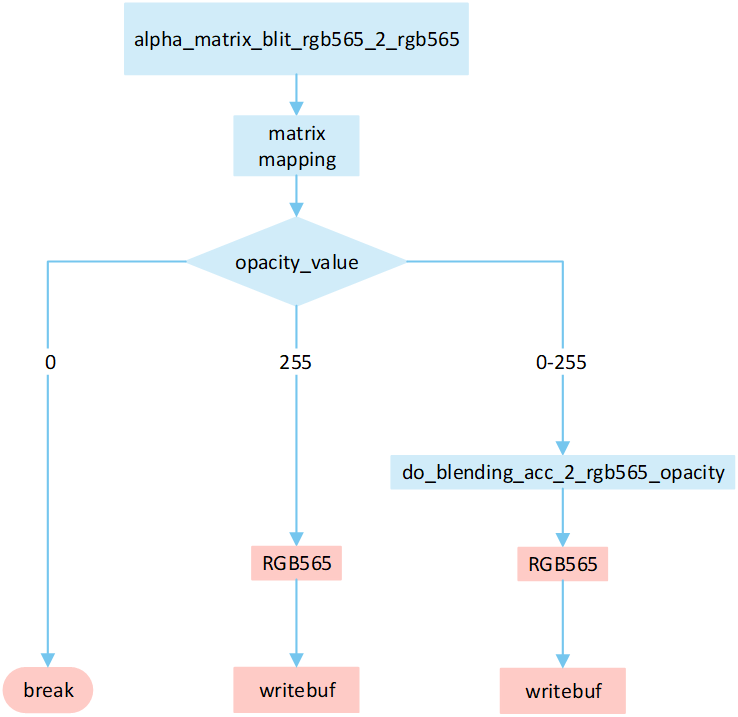
Alpha_matrix_blit_2_rgb565
Perform matrix calculation to map the target area write-in points to image pixels, and obtain the pixel value of the image pixels.
Based on the
opacity_value, execute the corresponding operation to write image pixels into the framebuffer.
If the
opacity_valueis 0, the image is not displayed and the process is break.If the
opacity_valueis 255, convert the source image pixels to RGB565 format and write them to the frame buffer.If the
opacity_valueis between 0 and 255, performrgb565_fast_blendingto blend the source image pixels with the corresponding frame buffer pixels. Write the blended result to the frame buffer.
Overview RLE Cover Mode
The following flow describes the cover mode process for RLE compressed image. Select a processing method based on the image matrix and the pixel byte of the display device, and write it to the frame buffer.
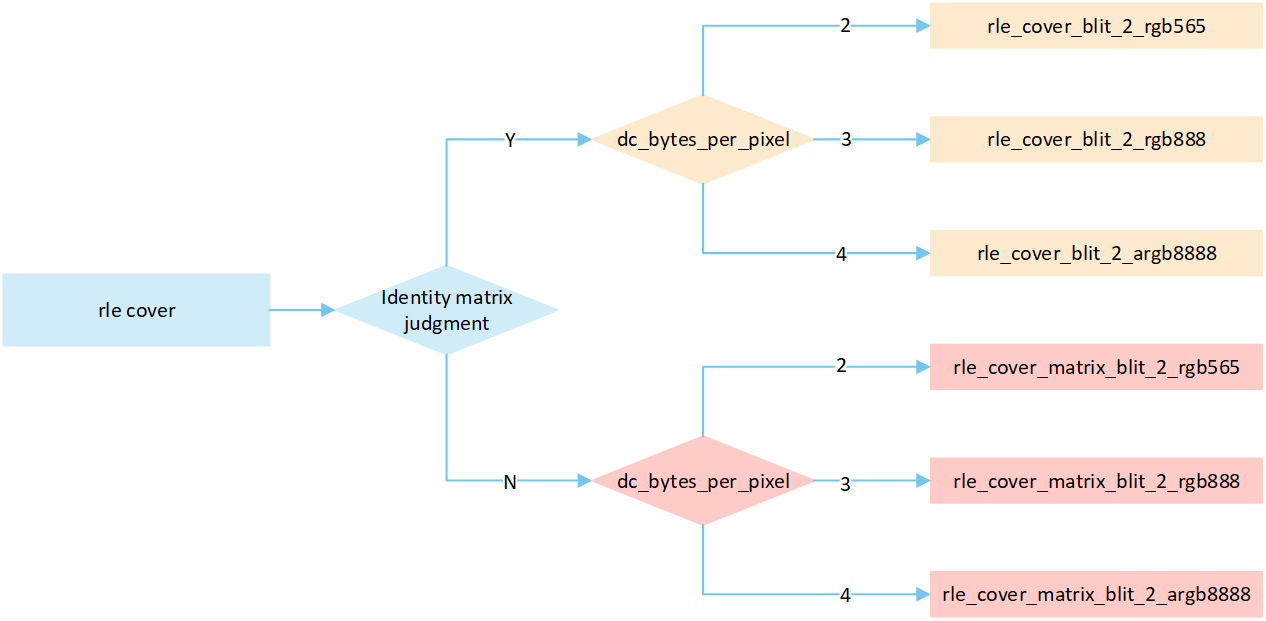
RLE_cover_mode_path
RLE Cover No Matrix
The following flowchart describes the process of writing compressed images to a frame buffer in cover mode. Taking the target device image type as RGB565 as an example.
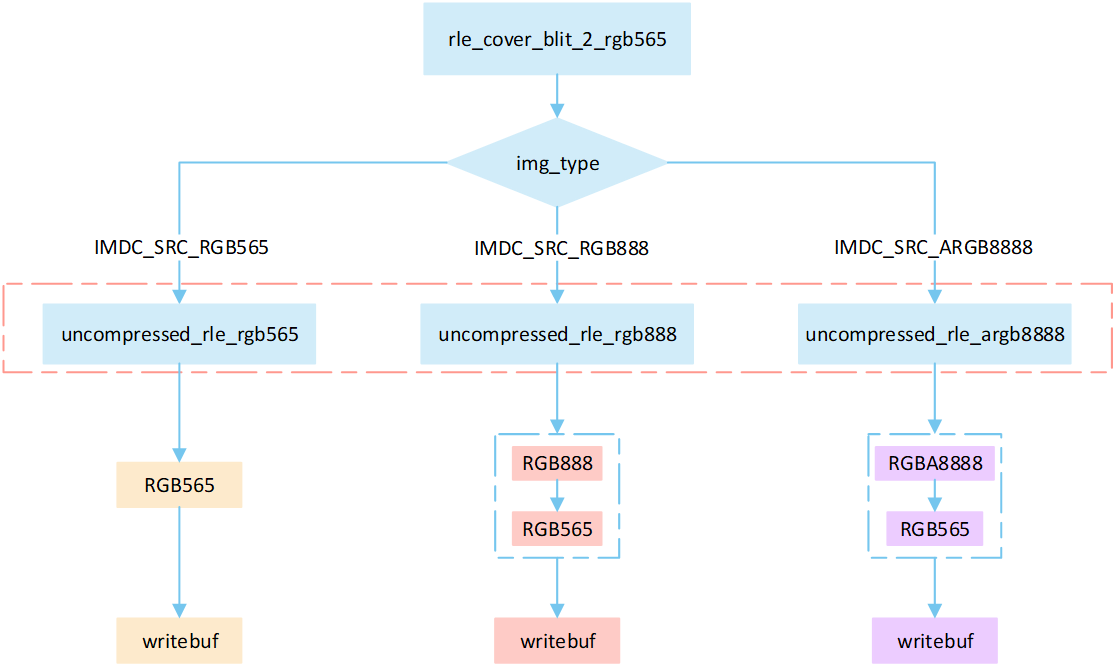
RLE_cover_blit_2_rgb565
Perform different processing steps based on the
img_typefrom the head of compression data.Decompress the compressed image data.
Write the pixel result to the frame buffer.
RLE Cover Matrix
The following flowchart describes the process of writing compressed images to a frame buffer in cover mode with matrix operations . Taking the target device image type as RGB565 as an example.
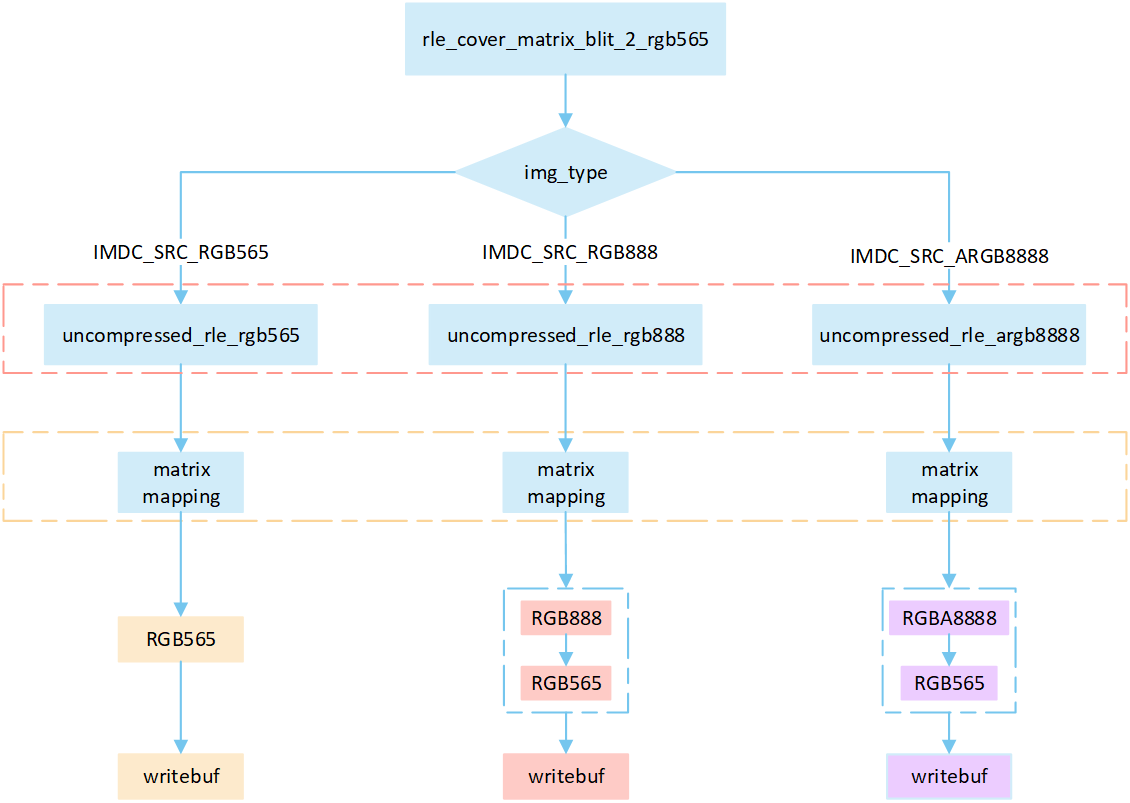
RLE_cover_matrix_blit_2_rgb565
Perform different processing steps based on the
img_typefrom the head of compression data.Decompress the compressed image data.
Perform matrix calculation to map the target area write-in points to image pixels, and obtain the pixel value of the image pixels.
Write the pixel result to the frame buffer.
Overview RLE Bypass Mode
The following flow describes the bypass mode process for RLE compressed image. Select a processing method based on the image matrix and the pixel byte of the display device, and write it to the frame buffer.
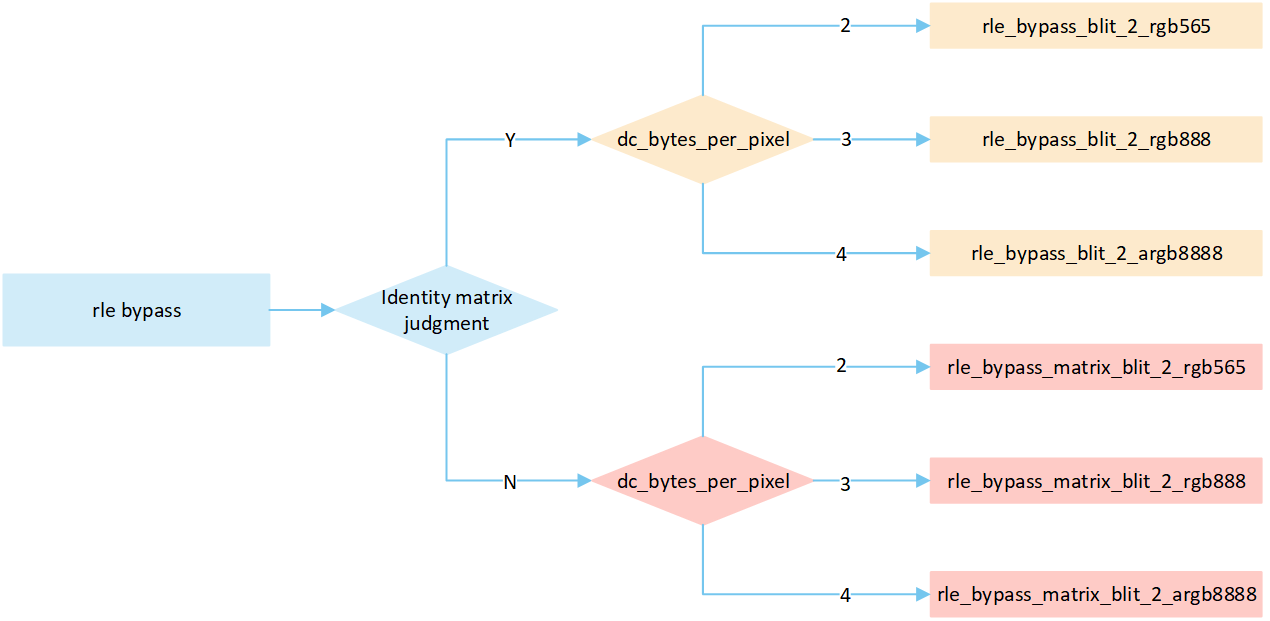
Rle_bypass_mode_path
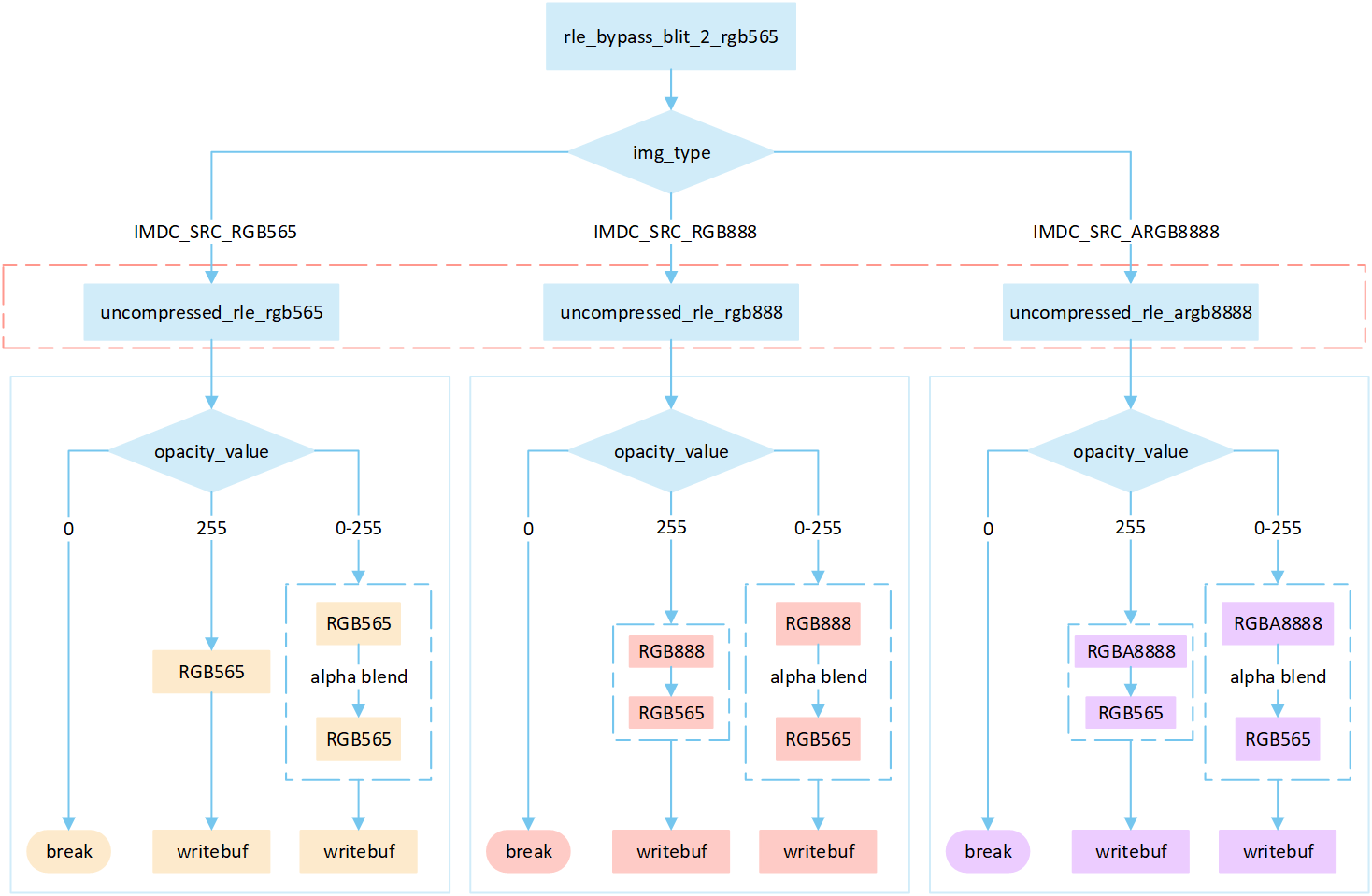
RLE Bypass No Matrix
The following flowchart describes the process of writing compressed images to a frame buffer in bypass mode . Taking the target device image type as RGB565 as an example.
RLE_bypass_blit_2_rgb565
Perform different processing steps based on the
img_typefrom the head of compression data.Decompress the compressed image data.
Based on the
opacity_value, execute the corresponding operation to write image pixels into the framebuffer.
If the
opacity_valueis 0, the image is not displayed and the process is break.If the
opacity_valueis 255, convert the source image pixels to RGB565 format and write them to the frame buffer.If the
opacity_valueis between 0 and 255, perform an alpha blending operation to blend the source image pixels with the corresponding frame buffer pixels. The blending formula is ((255 - Sa) * D + Sa * S) / 255). Write the blended result to the frame buffer.
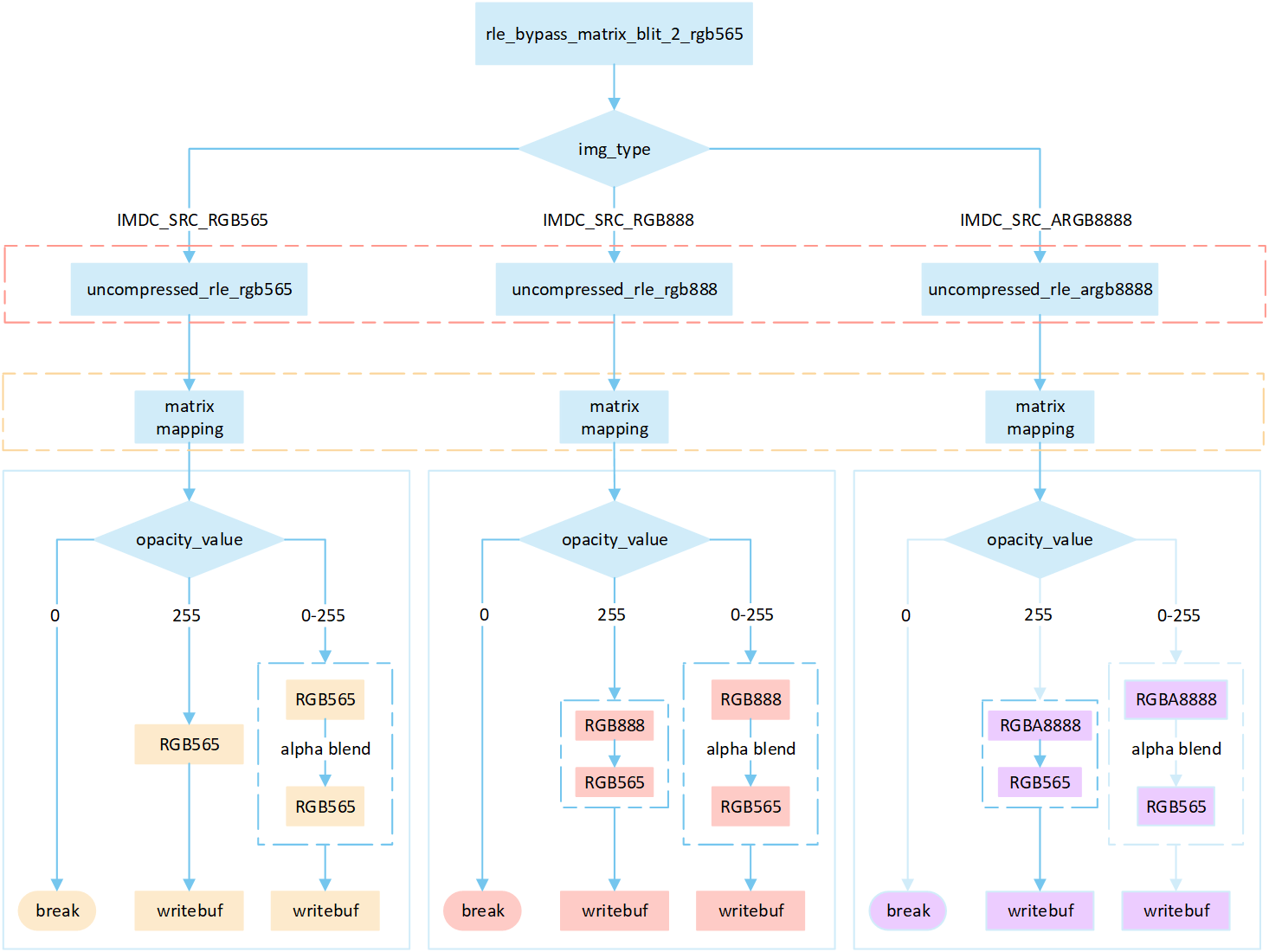
RLE Bypass Matrix
The following flowchart describes the process of writing compressed images to a frame buffer in bypass mode with matrix operations. Taking the target device image type as RGB565 as an example.
RLE_bypass_matrix_blit_2_rgb565
Perform different processing steps based on the
img_typefrom the head of compression data.Decompress the compressed image data.
Perform matrix calculation to map the target area write-in points to image pixels, and obtain the pixel value of the image pixels.
Based on the
opacity_value, execute the corresponding operation to write image pixels into the framebuffer.
If the
opacity_valueis 0, the image is not displayed and the process is break.If the
opacity_valueis 255, convert the source image pixels to RGB565 format and write them to the frame buffer.If the
opacity_valueis between 0 and 255, perform an alpha blending operation to blend the source image pixels with the corresponding frame buffer pixels. The blending formula is ((255 - Sa) * D + Sa * S) / 255). Write the blended result to the frame buffer.
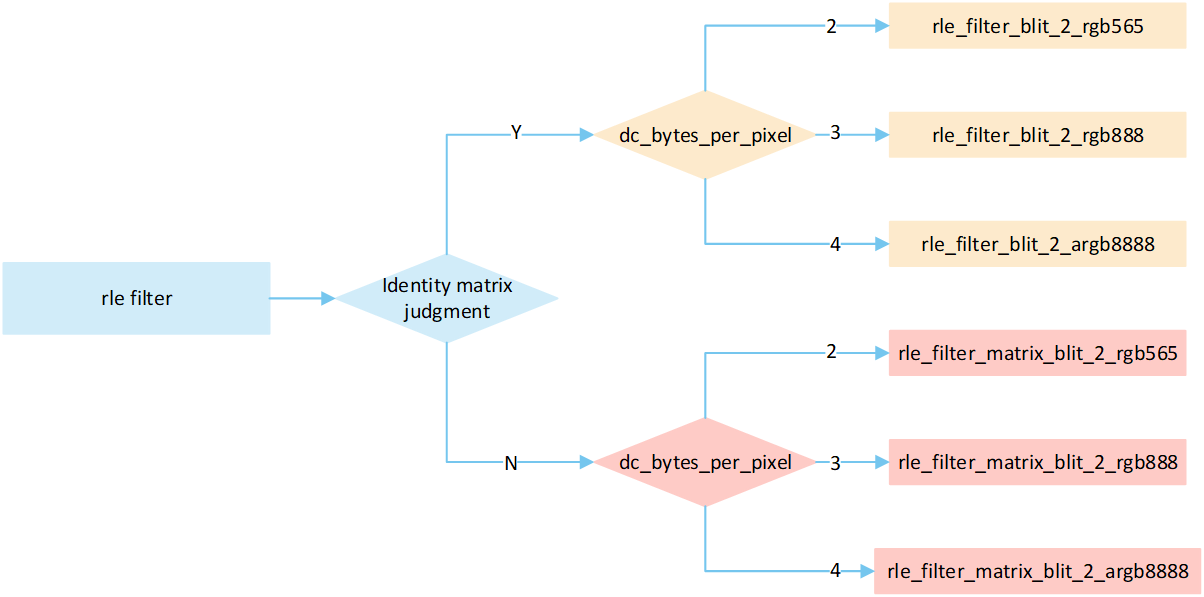
Overview RLE Filter
The following flow describes the filter mode process for RLE compressed image. Select a processing method based on the image matrix and the pixel byte of the display device, and write it to the frame buffer.
RLE_filter_mode_path
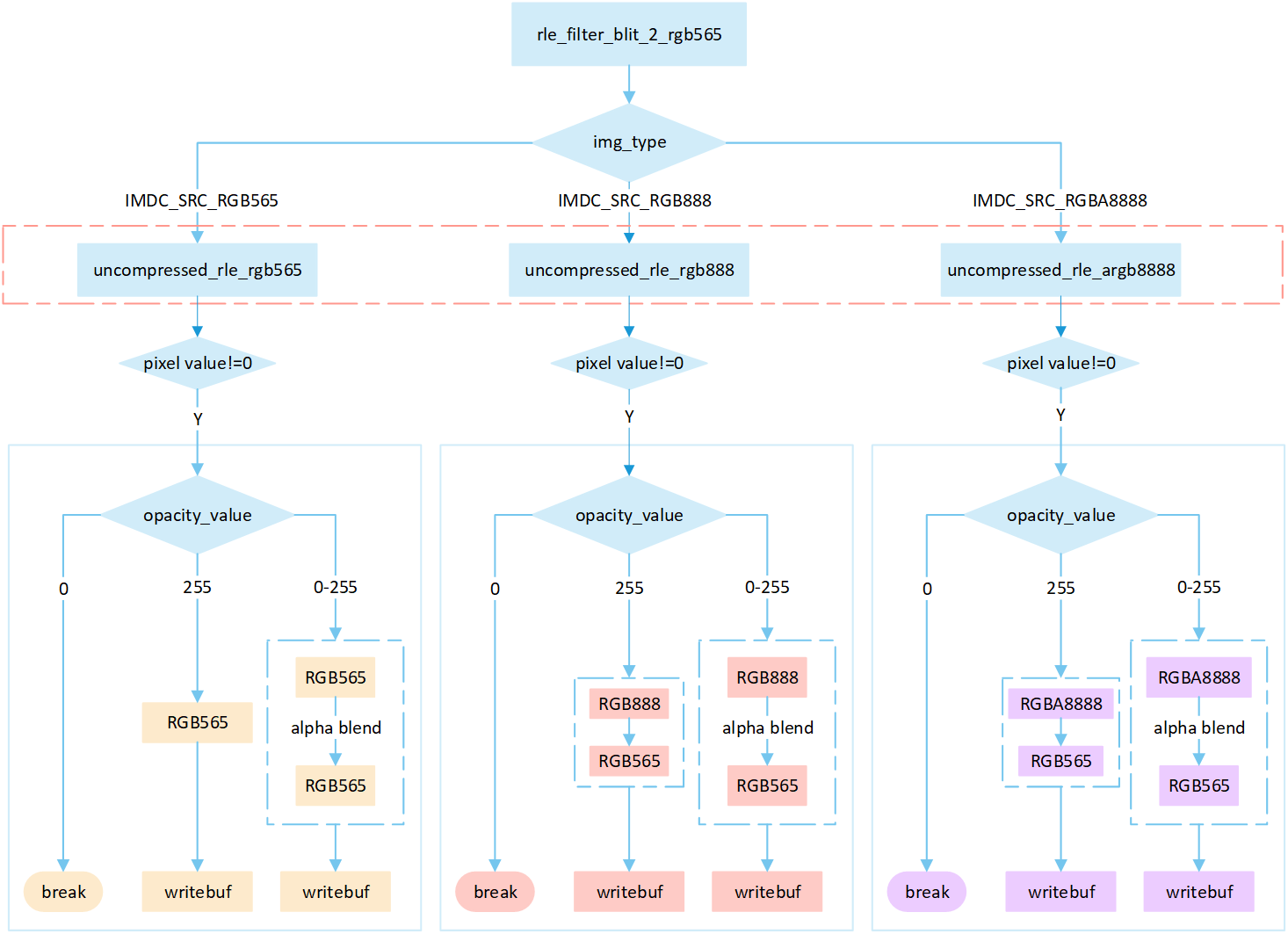
RLE Filter
The following flowchart describes the process of writing compressed images to a frame buffer in filter mode. Taking the target device image type as RGB565 as an example.
RLE_filter_blit_2_rgb565
Perform different processing steps based on the
img_typefrom the head of compression data.Decompress the compressed image data.
If the pixel value is 0, skip the processing; otherwise, perform the subsequent writing operation.
Based on the
opacity_value, execute the corresponding operation to write image pixels into the framebuffer.
If the
opacity_valueis 0, the image is not displayed and the process is break.If the
opacity_valueis 255, convert the source image pixels to RGB565 format and write them to the frame buffer.If the
opacity_valueis between 0 and 255, perform an alpha blending operation to blend the source image pixels with the corresponding frame buffer pixels. The blending formula is ((255 - Sa) * D + Sa * S) / 255). Write the blended result to the frame buffer.
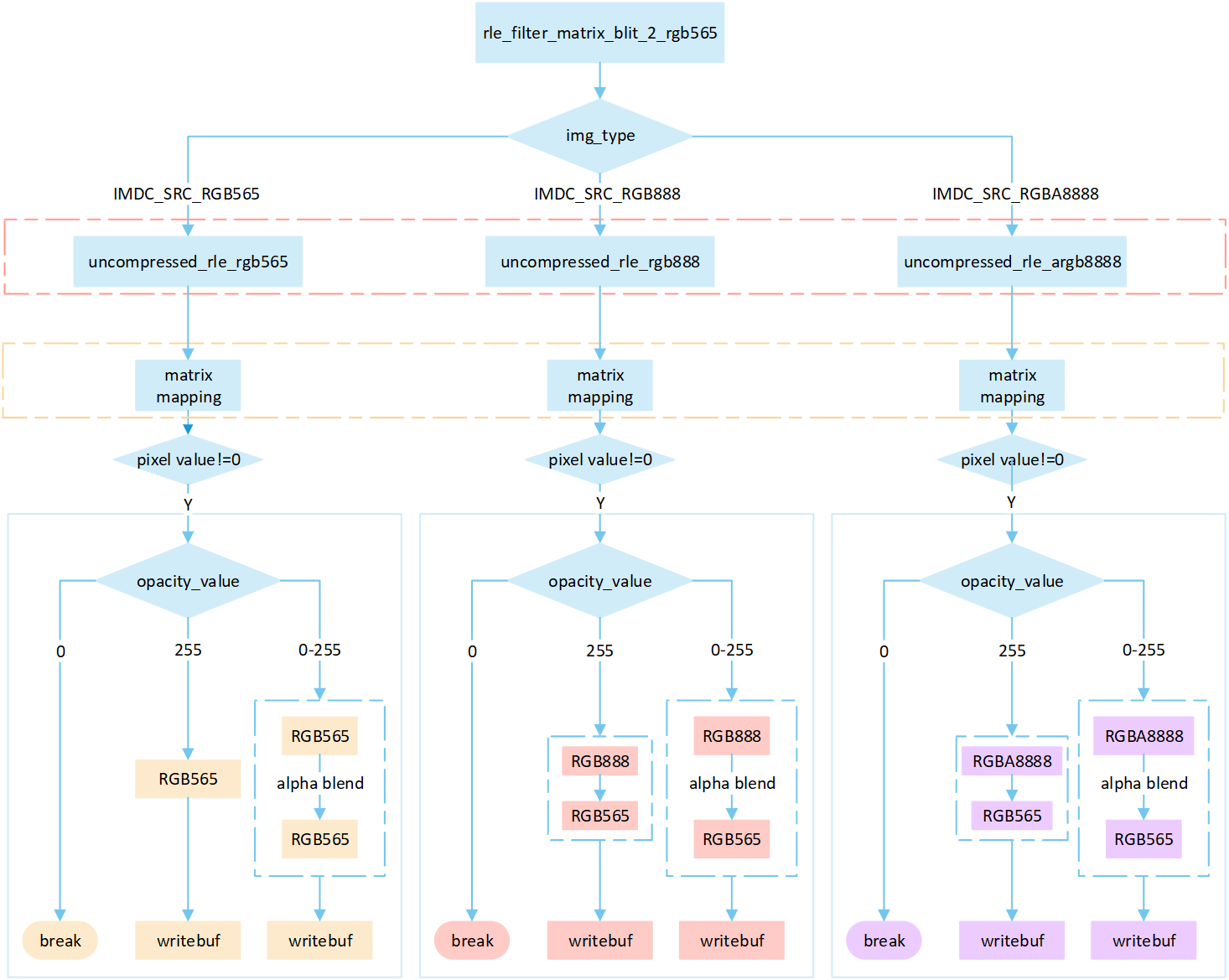
RLE Filter Matrix
The following flowchart describes the process of writing compressed images to a frame buffer in filter mode with matrix operations. Taking the target device image type as RGB565 as an example.
RLE_filter_matrix_blit_2_rgb565
Perform different processing steps based on the
img_typefrom the head of compression data.Decompress the compressed image data.
Perform matrix calculation to map the target area write-in points to image pixels, and obtain the pixel value of the image pixels.
If the pixel value is 0, skip the processing; otherwise, perform the subsequent writing operation.
Based on the
opacity_value, execute the corresponding operation to write image pixels into the framebuffer.
If the
opacity_valueis 0, the image is not displayed and the process is break.If the
opacity_valueis 255, convert the source image pixels to RGB565 format and write them to the frame buffer.If the
opacity_valueis between 0 and 255, perform an alpha blending operation to blend the source image pixels with the corresponding frame buffer pixels. The blending formula is ((255 - Sa) * D + Sa * S) / 255). Write the blended result to the frame buffer.
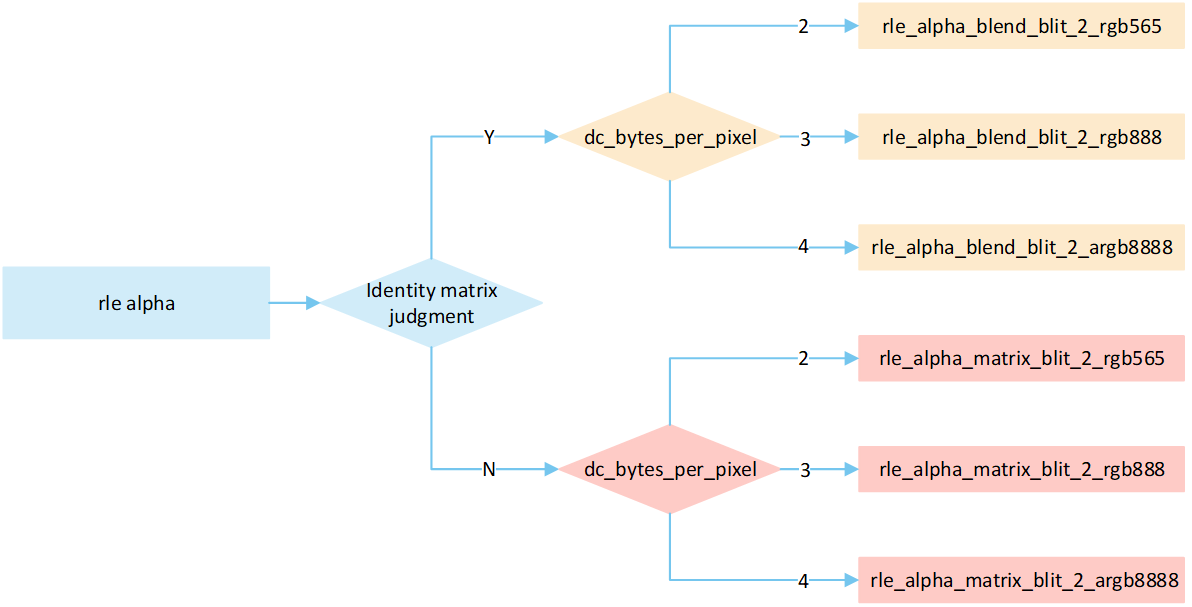
Overview RLE Source_over
The following flow describes the source_over mode process for RLE compressed image. Select a processing method based on the image matrix and the pixel byte of the display device, and write it to the frame buffer.
RLE_alpha_mode_path
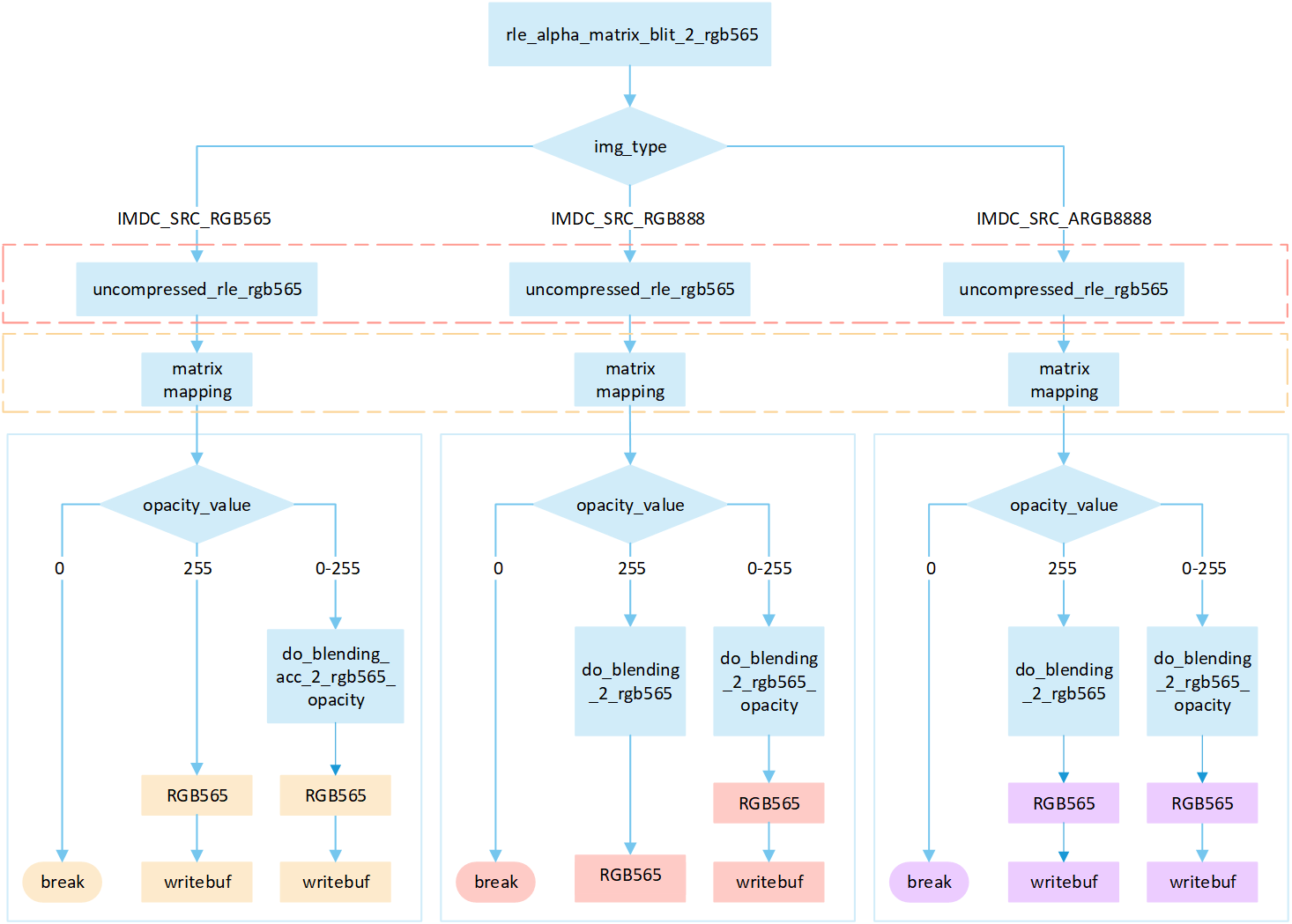
RLE Source_over No Matrix
The following flowchart describes the process of writing compressed images to a frame buffer in source_over mode. Taking the target device image type as RGB565 as an example.
RLE_alpha_blit_2_rgb565
Perform different processing steps based on the
img_typefrom the head of compression data.Decompress the compressed image data.
Based on the
opacity_value, execute the corresponding operation to write image pixels into the framebuffer.
If the
opacity_valueis 0, the image is not displayed and the process is break.If the
opacity_valueis 255: When the source image is in RGB565 format, directly write it to the frame buffer. Otherwise, perform the corresponding do blend operation and write the blend result to the frame buffer.If the
opacity_valueis between 0 and 255, perform the appropriate blending operation to blend the source image pixels with the corresponding frame buffer pixels. Write the blended result to the frame buffer.
RLE Source_over Matrix
The following flowchart describes the process of writing compressed images to a frame buffer in source_over mode with matrix operations . Taking the target device image type as RGB565 as an example.
RLE_alpha_matrix_blit_2_rgb565
Perform different processing steps based on the
img_typefrom the head of compression data.Decompress the compressed image data.
Perform matrix calculation to map the target area write-in points to image pixels, and obtain the pixel value of the image pixels.
Based on the
opacity_value, execute the corresponding operation to write image pixels into the framebuffer.
If the
opacity_valueis 0, the image is not displayed and the process is break.If the opacity value level is 255: When the source image is in RGB565 format, directly write it to the frame buffer. Otherwise, perform the corresponding do blend operation and write the blend result to the frame buffer.
If the
opacity_valueis between 0 and 255, perform the appropriate blending operation to blend the source image pixels with the corresponding frame buffer pixels. Write the blended result to the frame buffer.
Note
In compressed source_over matrix mode output rle_rgb888 and rle_rgba8888 equivalent to output as rle_rgb565.
Support Input Type and Output Type
Input type |
Output type |
|---|---|
RGB565 |
RGB565 |
RGB888 |
RGB888 |
ARGB8888 |
RLE_ARGB8888 |
ARGB8565 |
ARGB8565 |
RLE_RGB565 |
RLE_RGB565 |
RLE_RGB888 |
RLE_RGB888 |
RLE_ARGB8888 |
RLE_ARGB8888 |
RLE_ARGB8565 |
RLE_ARGB8565 |